Row Wizard
Info
This widget allows you to render one or more rows of arbitrary DCA fields. Each row consists of a configurable set of child widgets that are parsed and rendered directly by the core. The widget validates each child field individually and stores the resulting rows as a serialized array.
Features
- Parses and renders DCA field definitions directly
- Allows callbacks on the used widget fields
- Uses the existing backend Stimulus controllers
- Validation is handled by the individual child widgets
- Stores multiple rows as serialized data
- Optional drag & drop sorting (enabled by default)
- Configurable minimum and maximum number of rows
- Configurable row actions
Supported widgets
Since the Row Wizard parses DCA field definitions directly, it works with most standard widgets.
Known limitations
The following widget options and modifications do not work within the row wizard
eval.color-pickereval.datepickereval.rte- Any modifications that append JS to the widget (via
DataContainer::row()) - Custom widgets provided by extensions that are dependent on JavaScript (Stimulus controllers may work)
Additional information about known limitations can be read in the associated pull request.
Options
This table only shows the options relevant to the core functionality of this widget. See the DCA reference for a full field reference.
| Key | Value | Description |
|---|---|---|
inputType | rowWizard (string) | |
fields | array | Associative array of DCA field definitions rendered per row. |
fields.<FIELD>.eval.cell_class | CSS class(es) (string) | Same as eval.tl_class but the classes are applied to the widget cell. |
| + | ||
fields.<FIELD>.eval.cell_style | CSS styles (string) | Same as eval.style but the styles are applied to the widget cell. |
eval.actions | array | Allowed values: copy, delete, enable. Default: ['copy', 'delete']. |
eval.sortable | bool | Enables or disables drag & drop sorting (default: true). |
eval.min | int | Minimum number of rows. |
eval.max | int | Maximum number of rows. |
Field Callbacks
You can register [callbacks]({{ relref “callbacks” }}) for Row Wizard fields using the following schema: fields.<FIELD>.fields.<FIELD>.<CALLBACK>,
for example fields.rowWizard.fields.type.options
Column Definition
The Row Wizard stores its data as a serialized array containing all defined rows and their field values. Since the total length cannot be predicted, a blob column is recommended.
Examples
Usage within contao/core-bundle
All options
Usage in Contao
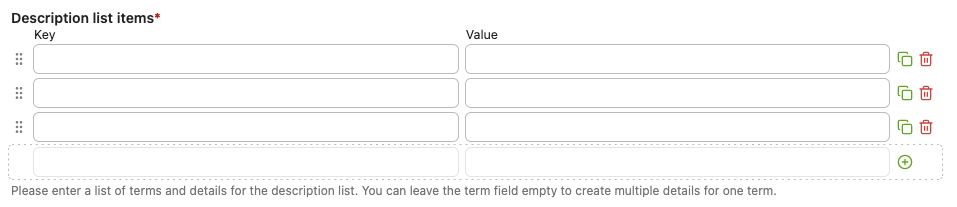
The row wizard widget is used in the Description list content element for example in order to be able to enter the list of description terms (the “key”) and description details (the “value”).